
How to Register
Follow these simple steps to complete your registration
Step 1: Open the Registration Form
Visit our Home Page and scroll down to find the registration form section.
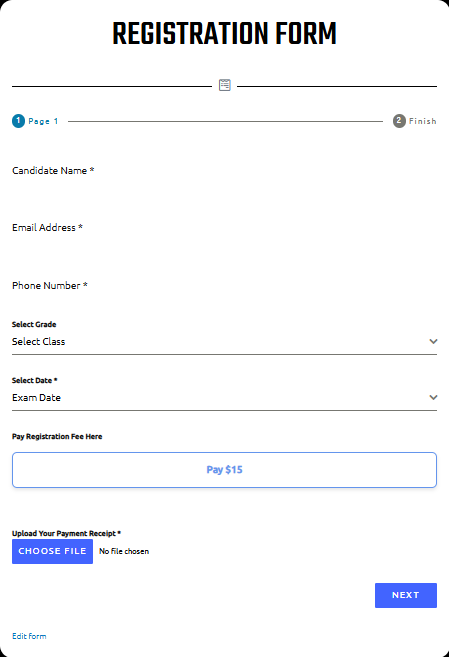
Step 2: Fill Candidate Details
- Candidate Name* – Enter your full name
- Email Address* – Provide a valid email
- Phone Number* – Enter an active mobile number
- Select Grade – Choose your grade/class
- Select Date* – Pick your exam date
Step 3: Pay the Registration Fee
Click on the “Pay Registration Fee” link in the form. Complete the payment and save your receipt.
Step 4: Upload Payment Receipt
Use the upload option in the form to submit your PDF/JPG/PNG receipt.
Step 5: Create Exam Account
On Page 2 of the form, set a Username and Password. This account will be used to log in and appear for the exam.
Step 6: Submit
Review all details and click Submit. You’ll receive a confirmation message after successful submission.
✅ Registration complete! Keep your email and phone number active for updates.